Moodle Review No. 2 Part 1: Enabling Javascript and Cookies in Browsers (Firefox)Cookies What are
cookies? They're parcels of text sent back and forth between your browser and the server you are accessing. Usually used for authentication and other user information needed by the server.
A Moodle server may send you two types of cookies.
- MoodleSession - essential, necessary to maintain login from page to page. It is destroyed when you log out or close the browser.
- MOODLEID - not essential, safe to refuse, just for convenience. It remembers your username within the browser. When you return to the page, the username in the login page will be filled.
JavaScriptWhat is
JavaScript? It's a usually a small computer program embedded in the html web page that you access. It makes your web page more interactive like allowing floating clocks on your web page. It can make your web page behave like a local application. Without it, the html usually is static and all you can do is read it. JavaScript adds fun in your browsing experience.
Why is it needed in moodle? For interactivity and functionality. It is also required in certain modules like when you display a secure window in quizzes, or use a timer.
Enabling JavaScript and Cookies in BrowsersJavaScript and Cookies are usually enabled by default in browsers for
Ubuntu Intrepid.
Firefox and
Konqueror are "free software" and are distributed by Ubuntu, but
Opera is not.
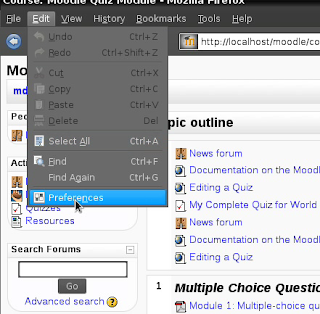
Firefox 3.0.7To turn on JavaScript go to the
menu->edit->preferences. The Firefox
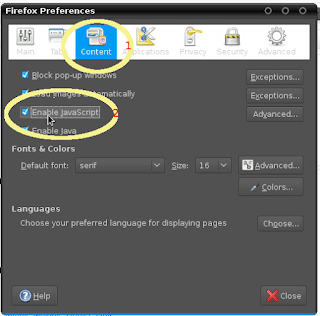
preferences dialog box will pop-up.
Click
content->check Enable JavaScript.
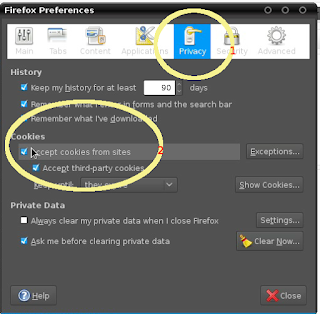
To accept cookies click
Privacy and under
Cookies check
Accept cookies from sites.
Here's a screenshot of the entire process:




 Posts
Posts


